sql server 2005 etiketine sahip kayıtlar gösteriliyor. Tüm kayıtları göster

Çarşamba

SharePoint trying to login deleted SSP database!

Yesterday I realized a very strange issue, on SharePoint Db server event log. Sharepoint admin user was continuosly throwing login failed errors on server event log


See? This event id= 18456 errors were not stopping and "Failure Audit" part  panicked me. But one moment.. Everything was working ok? no service interruption, moss was fine!

So i just logon to SQL Server Management Studio to Sharepoint DB see what was going on on SQL error logs.


Login failed to Genelssp_db!!
But.. Genelssp_db belonged to a Shared Services Provider (SSP)  which we deleted a few days ago!

Then with further investigation, found out that there is a job belonging to those dead and long gone  ssp  which was trying to delete expired sessions. GenelSSp_DB_Job_DeleteExpiredSessions

I disabled it and everything went fine..
The errors are gone.
I dont know why moss orphaned those job because I deleted this SSP via central administration and it was a succesfull deletion.. 

Domain Controller Reboot problem

Yesterday we had a very strange problem.

Last week our dns and DC's were upgraded to Win 2008

Yesterday, After the DC reboot, Sharepoint crashed. trying to understand what happened, I saw that SQL server was unable to accept new connections and was continuously throwing this errors:


Event Type: Error
Event Source: MSSQLSERVER
Event Category: (4)
Event ID: 17806
Date: 6/23/2010
Time: 10:05:26 AM
User: N/A
Computer: SRV29
Description:
SSPI handshake failed with error code 0x80090304 while establishing a connection with integrated security; the connection has been closed. [CLIENT: 10.3.0.49]


For more information, see Help and Support Center at http://go.microsoft.com/fwlink/events.asp.


---

Event Type: Failure Audit
Event Source: MSSQLSERVER
Event Category: (4)
Event ID: 18452
Date: 6/23/2010
Time: 10:05:26 AM
User: N/A
Computer: SRV29
Description:
Login failed for user ''. The user is not associated with a trusted SQL Server connection. [CLIENT: 10.3.0.49]

For more information, see Help and Support Center at http://go.microsoft.com/fwlink/events.asp.

I was panicked, that was really trouble! The first thing I did was to restart the SQL Server service, and an IIS reset on the WFE of Sharepoint side..


But it didnt work. So I reboot both the WFE and SQL Server of Sharepoint farm and everything started to work again.


After a little investigation, we saw that our technician had entered only the first DNS , forgot the second. After he entered both DNS we reboot the DC machines again and everything went fine. -Actually, there was a 5 seconds of interruption, which could be seen on SQL server's event log but it  did not cause any service interruption and SharePoint & other applications was not affected.-


So If you encounter this errors after DC reboots, check if the dns name resolving is working..

Cuma

SQL server Restore Error

I got this error when trying to restorea database from the SQL Server Management Studio..


An exception occurred while executing a Transact-SQL statement or batch. (Microsoft.SqlServer.ConnectionInfo)
------------------------------
ADDITIONAL INFORMATION:
The media family on device '\\tup03srv32\Backup\SQL\tup03srv06\WSS_Content_backup_201006100000.bak' is incorrectly formed. SQL Server cannot process this media family.
RESTORE HEADERONLY is terminating abnormally. (Microsoft SQL Server, Error: 3241)

Then I run the restore command via Query Editor and it worked!


RESTORE DATABASE [WSS_Content] FROM DISK = N'\\Tup03srv32\backup\SQL\tup03srv06\WSS_Content_backup_201006100000.bak' WITH FILE = 1, MOVE N'WSS_Content' TO 'c:\evrak\WSS_Content.mdf', MOVE N'WSS_Content_log' TO N'C:\evrak\WSS_Content.ldf', NOUNLOAD, REPLACE, STATS = 10 GO


Salı

How to shrink log file (ldf) on SQL Server 2005-2008

If you are using Full or Bulk logged recovery model, the log file sometimes grows huge and you have to shrink it once I saw a logfile that is 40 GB !

open SQL Server Management Studio and open a new query window, execute this chunk of t-sql code:


USE [Your_db]
GO DBCC SHRINKFILE(N'Your_db_log', 50)
BACKUP LOG Your_db WITH TRUNCATE_ONLY
DBCC SHRINKFILE(N'Your_db_log', 50)
GO

Çarşamba

SQL Server 2005 Standart Edition and Sharepoint Database Mirroring Scenario

No matter how Microsoft offers Database Mirroring scenarios with SharePoint core db's, I was told not to mirror the SharePoint_Config and  Sharepoint_Admin databases, by SharePoint Pros. I am really not sure why that could cause trouble, and how (considering the high protection scenario does not allow commiting on principal before the mirror is committed the transaction), I'd rather not to apply mirroring to sharepoint core db's such as config, admin and SSP db's, I'd prefer to extend the central administration and other web applications by adding new WFE's to farm..

Actually, the ones that is critically important is the content db's, which we focus on not to lose any data. With content Db's in hand, you can simply install a new SharePoint and restore the content db's here in a worst disaster case. Anyway, this post will focus on mirroring the content databases and taking over the mirror when the principal is...long gone!


To start Database Mirroring, You should first 

-take a full backup of the database you desire 
- restore it with NO RECOVERY 

then, go to the Principal server; Principal is the database you want to mirror. 


Right Click the database you want to mirror, Select Tasks & Mirroring.
Now you will see the dialog box above.
Before Starting Mirroring you should first configure security between the principal and the mirror. Click the configure security button.


Skip the first screen, seen above


Now it will ask you to choose a witness server or not. A witness server is a simple server that monitors the mirror and the principal and provides  automatic failover if it decides that the principal is not available. If you really don't need to provide automatic failover, don't choose this. Besides, you should not really be able to provide auto failover, because you should point out the content_db's new location to Sharepoint Central Administration manually.


I choose no Witness so in the next screen, as seen above, just the mirror is selected.


Review the principal's properties and click next (above)


Next, you'll see the mirror properties. (above)


Select the mirror server instance and click connect. Then click next again (screen shot above )


Then it will ask you to enter the service accounts on the principal & mirror. make sure that this accounts have "run as service" permission on the servers. (above)
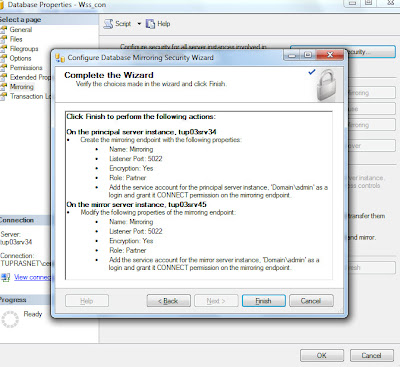


After clicking next, a summary will be displayed. Click finish.


and then you can start mirroring!

But remember,
SQL Server 2005 Standart Edition supports only Synchronous Mirroring in high protection mode


Salı

User Already Exists in the Current Database - after moving databases or deleting users

I have encountered this nasty little error on SQL Server 2005 after moving the database to a new server...
I did not restore the master database, just restored the content db's to the clean installation.

And then of course, I had to create the logins. When I tried to create SQL logins, sql server nagged about
The server principal 'TPG01_reader' already exists.


So here is what i did:

- deleted the user i have created (because even though it give this error , still creates the user)
- removed the user from database permissions: Rigth clicking  database > properties> permissions (screenshot below)


- Remove the user from the related database's security section (screenshot below)
Attention, not the general  security section, this is the database> security.


Voila!
now you can create your user ;)

Çarşamba

Notes for Configuring SQL Server 2005 database mirroring for SharePoint

You have to use synchronous mirroring for SharePoint's own databases (Sharepoint_admin, config vs.)
But you can use both async and sync for Content Databases.

Pazartesi

SQL 2005 mirroring for Sharepoint 2007- a note

Sharepoint Central administration database - Sharepoint_admin content and Sharepoint configuraton db Sharepoint_config  can only be mirrorred using Synchronous mirroring.
Asynchronous does not work

How to setup Database mail to send Backup completion notifications in sql server 2005

I did all the steps here ; the test mail worked fine but een after a succesful execution i did not receive any emails..

after some struggling,  i found out that you also have to enable mail profiles through SQL Server Agent properties &   restart agent one more time